Many times there are business reasons for removing or deleting a Solution from the application. The Dovetail Employee Engagement Suite does not permit deletion of Solutions. It does, however, allow you to retire a Solution, effectively removing it from use.
Keywords: Solution, delete, remove, retire, visible, permission
Because the policies or procedures of an organization may change, it is possible to retire a Solution from use.
When the Solution is opened, the Status and Public flags are displayed in the left sidebar.
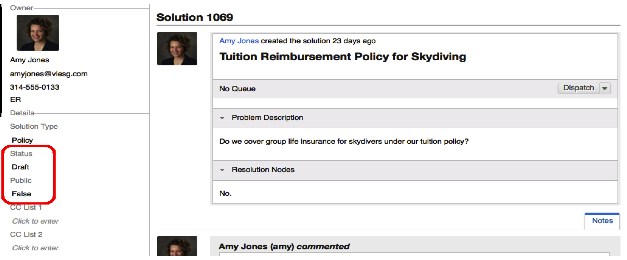
The Status flag indicates the current state of this Solution. This may be changed to identify those that are in draft, are published, or retired.
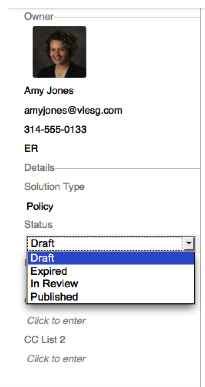
When a Solution is no longer accurate or relevant, the status should be changed to Expired.
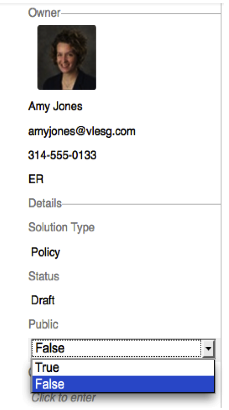
The Public flag is the indicator that determines whether or not an employee using the Employee Service Portal (ESP) or related functions may view this Solution. Only those Solutions marked as True will be visible. Even if marked as False, however, they will still be available to the HR team as a reference point.
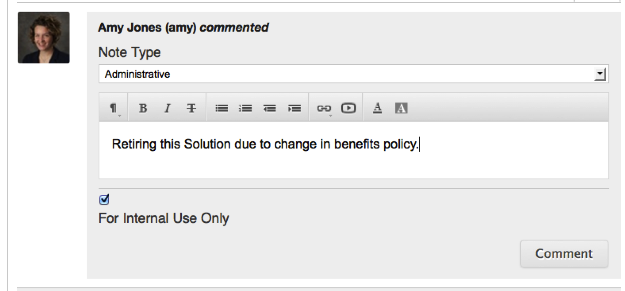
If a Solution is no longer in use, it is a good practice to indicate in the Notes section the reason it has been retired. These notes are never exposed to Employees through the ESP.