The Dovetail Employee Engagement Suite allows for flexibility in controlling which users can see certain data. This is a common setup when there are users in different geographies. Many times, business needs dictate that users in one country only have visibility to Cases and related data that is applicable to their country. This setup can be accomplished with the usage of rules, labels and events to help protect this geography restriction.
Keywords: geography, data, restriction, visibility, label, protect, global label
To partition and protect cases pertaining to country specific employees, the following rules may be put in place. First, a system label should been defined for the country. In this example, we will use cases for Germany, and will assign the Orange label.
Two rules are created to assign this label. The first for any case where the employee is located in Germany and one for any case where the concerning employee is located in Germany. By adding a second trigger of the employee or concerning employee being changed, we ensure this label is assigned even if the employee is identified after creation.
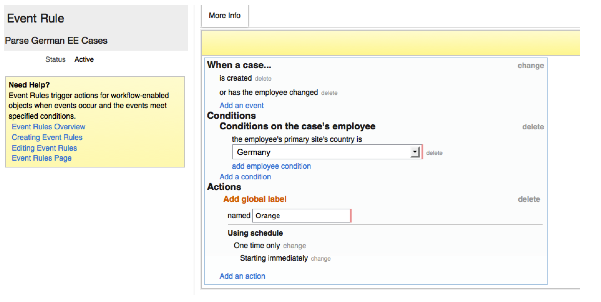
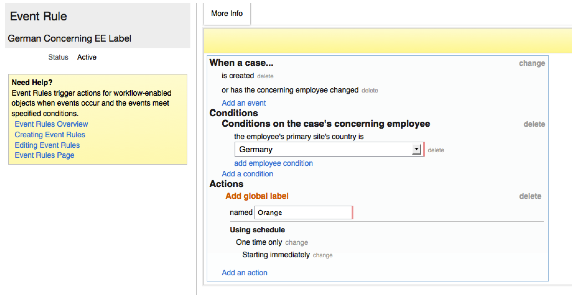
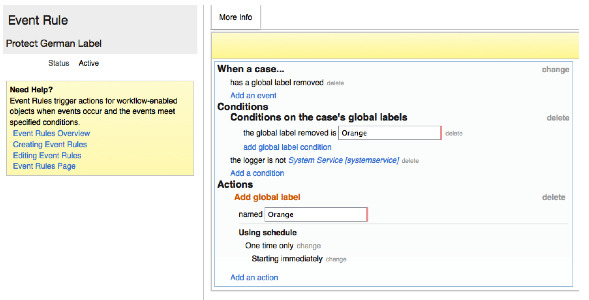
A third rule as has been added to ensure this label is protect. If the label is removed by any means other than a system-generated action, it will be reapplied immediately.
Access to cases with this label is then removed from all roles, and is only granted to the Germany-based users with a new, single permission role.
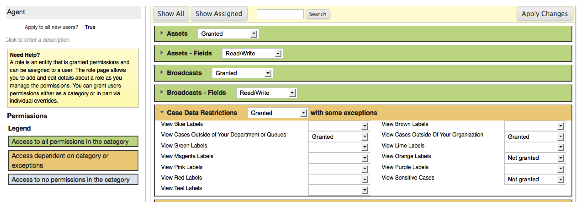
All cases pertaining to employees in Germany will now have this label added. These cases will no longer be visible to users other than those in Germany.